[[duration]] minutes
This content is generated by Google AI. Generative AI is experimental
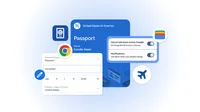
Autofill continues to save you time on online tasks like flight check-ins or parking payments. We recently took autofill to the next level, letting you automatically fill more complex data types, including flight details and vehicle information, like your license plate and VIN. Starting today, we’re extending these capabilities to iOS and Android users.
At the same time, we’re deepening our integration with Google Wallet across mobile and desktop. Chrome can now automatically fill forms using data that’s stored in your Google Wallet, including driver’s license details, passport information and your Known Traveler Number. If those details aren’t already stored in your Wallet, you can save them there when you enter them in Chrome for the first time.
Chrome will only save or fill your information with your permission, and, as always, sensitive data is encrypted. Manage or update your data in your Google Wallet settings or on the “Autofill and passwords” page in your Chrome settings. Private passes, like IDs, can be managed through their own controls.